-
I was using #Chrome today when I happened to notice a tag line that it was "managed", meaning some company owns the browser as a corp device. This was confusing to me because it was my *personal* computer, never associated with any company. WTF? Was this a hack or something?On twitter.com
 ❤️ 1 Favorite
Mood -6 🙁
❤️ 1 Favorite
Mood -6 🙁
-
What "organization" is managing my browser? Looking around, there is malware that manages your browser, but usually to manipulate it into using their search engine / trick you into other things. I hadn't noticed any sketchy behavior recently, was someone spying on me?Permalink On twitter.com
❤️ 1 Favorite
Mood 0
-
I found that you can "unmanage" the device on #Windows by deleting some registry keys, I started digging around to look for any identifying information, a company name, C&C URL, ... support.google.com/chrome/a/answer/9844476?hl=en#zippy=%2CwindowsPermalink On twitter.com
❤️ 1 Favorite
Mood 0
-
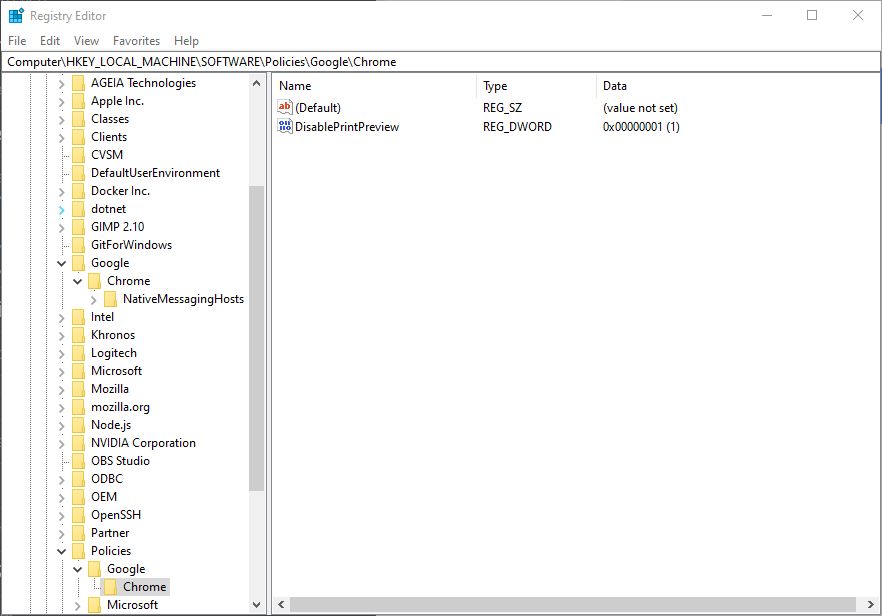
All the registry keys were empty except for one:Permalink On twitter.com
DisablePrintPreview. This sounded really familiar, had I edited this before? Digging through my browser history, I found this page about disabling print preview: pupuweb.com/solved-fix-print-preview-chrome/
Mood -2 🙁
-
Then it hit me, a long time ago I encountered a Chrome bug where printing a web page would just hang on the preview screen. My workaround was to regedit the key to disable that preview screen so I could print the page. Worked at the time, and I forgot all about it.Permalink On twitter.com
Mood -1 🙁
-
Apparently a side effect I hadn't noticed is that setting this policy meant that Chrome assumed this device was managed by organization, even though there was no other information to that effect on the device. Deleting this key removes the "Your device is managed" message.Permalink On twitter.com
Mood -1 🙁
-
Not sure what the point of this was, but I guess this is a fun fact about Chrome? If you enable any policy registry key, it just assumes you're on a managed device with no additional configuration required. That was a fun 30 minutes.Permalink On twitter.com
❤️ 2 Favorites
Mood +7 🙂